Connection lost
Trying to reconnect…
Server didn't respond
Recovering…

Control what runs
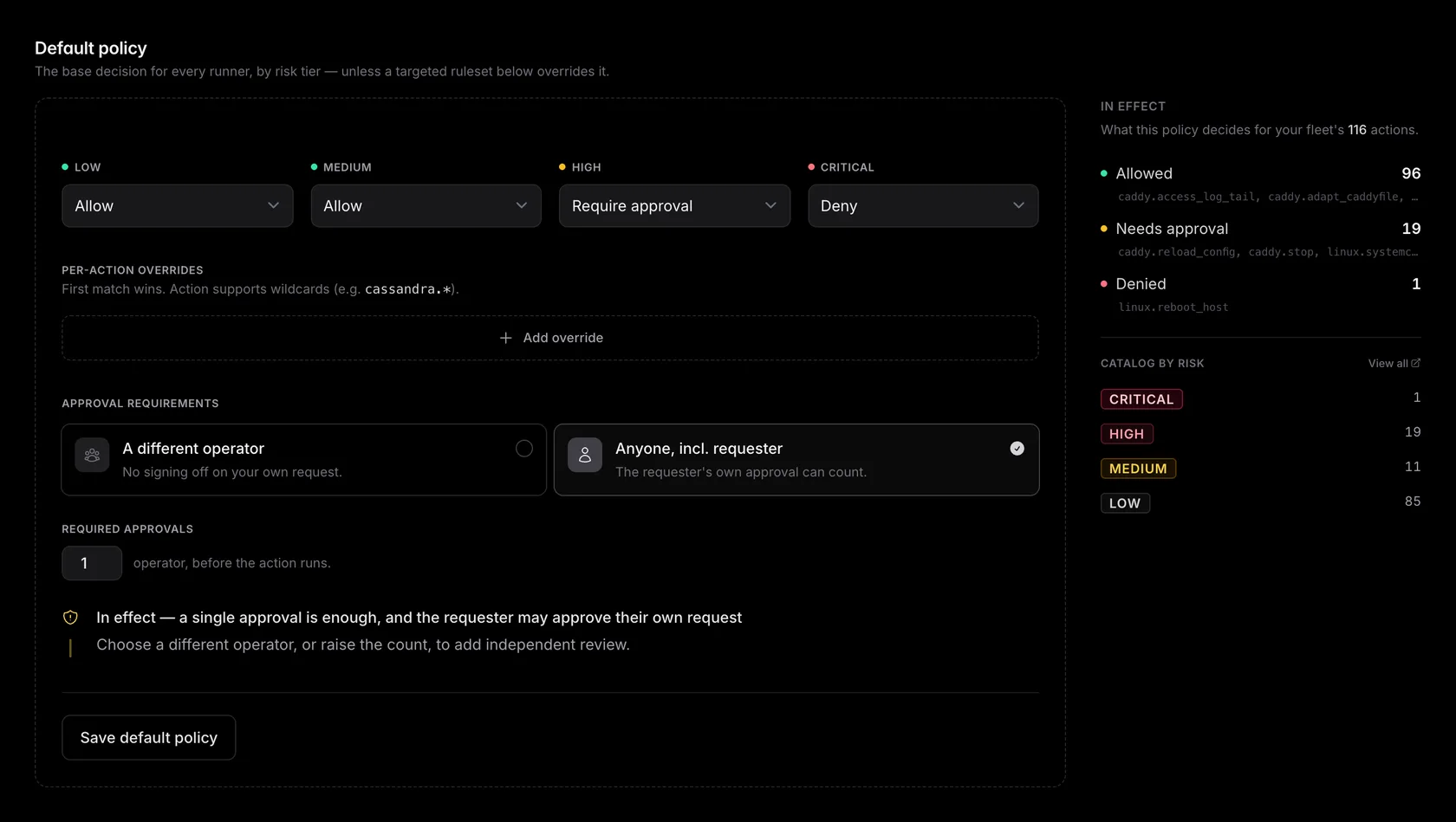
Every dispatch — human or LLM — passes through your account's policy before it touches a runner. The policy answers one question per action: run it now, stop for a human, or refuse. This page covers how the decision is made, how approvals work when policy demands one, and how standing grants keep repeat approvals from becoming busywork.
How a decision is made
The policy has two layers, evaluated in order:
-
Per-action overrides.
An ordered list of rules, each a glob over action IDs with a decision —
nomad.job_*→require_approval,*.delete_*→deny. The first matching override wins; order them most-specific first. -
Risk-tier defaults.
If no override matches, the action's declared risk tier
(
low/medium/high/critical) picks the decision. Risk is declared in the pack and can't be changed by the caller.
Decisions are allow
(dispatch immediately), require_approval
(hold for a human), and deny
(refuse outright). Anything the policy can't
answer — no policy saved yet, an unknown tier — is a deny: the system fails closed, never open.
allow,
high require_approval, critical deny, no overrides. That's a sane day-one posture —
reads and routine diagnostics flow, mutations stop for a click, destructive actions
don't run at all until you explicitly open them up.
Editing the policy
Policies
in the dashboard sidebar. Owners and admins edit; operators and
viewers see the current rules read-only. The editor mirrors the two layers: four tier
dropdowns up top, the ordered override list below. Tier defaults are
monotonic by construction
— the editor (and the
API behind it) rejects a policy where a higher tier is more permissive than a lower one,
so you can't accidentally allow
critical
while gating medium.
Every save bumps the policy version, writes an audit event with the exact diff (which overrides were added, removed, or changed), and applies to the next dispatch. Each run records the policy version that gated it, so an audit review can always answer "what was the policy when this ran?"
Scope it to a runner or group
Your default policy governs the whole fleet. When a single runner or a group of runners needs different rules — a locked-down database box, a more permissive staging group — add a targeted ruleset for that runner or group, right on the Policy page.
Resolution is most-specific-wins: a dispatch to a runner is governed by that runner's ruleset if one exists, otherwise its group's ruleset, otherwise the default policy. The ruleset that matches is evaluated whole — its own tier defaults and overrides decide the action. A ruleset replaces the default policy for that runner or group; it doesn't layer on top, so what the editor shows for a scope is exactly what runs there. Remove a ruleset and that scope falls back to the next-broader policy.
Pattern: let an agent iterate on staging, hands-off
Scope an allow-everything ruleset — every tier set to allow, no
approvals — to your staging
runner group. An agent can then reproduce a bug, try a fix, and verify it end to end with
nobody in the loop, then hand you the change to apply on prod — where your stricter
default policy still gates every mutation behind one approval. The blast radius stays on
staging; the gate stays where it matters.
Approvals
When policy says require_approval, the run is created
in a held state and an approval request opens. Teammates who can decide — owners, admins,
and operators — get an email with a link straight to the request; it also appears under
Approvals
in the dashboard with a live badge.
- — The approver sees who asked, the exact action and arguments, the target runner, and the stated reason — enough to decide without leaving the page. One click approves or denies.
- — Undecided requests expire after 24 hours and the held run is cancelled — nothing waits forever.
-
—
An LLM waiting on an approval long-polls
wait_for_runand picks the result up the moment a human decides — no busy retry loop. - — Every decision is audited: requester, approver, action, args, and reason.
Standing grants
Approving the same
nomad job revert
every morning is how approval fatigue starts. When you approve a request you choose a
duration: once
(this run only), or a standing
grant for 1 hour, 24 hours, 30 days, or 90 days.
A standing grant lets matching future calls skip the queue:
- — Scoped tight. A grant is bound to the API key it was issued for, the action, optionally the specific runner, and — your choice at approval time — either the exact argument fingerprint or any arguments. A grant for key A never covers key B.
- — Capped and revocable. Grants can carry a maximum use count, expire on schedule, and are listed under Approvals where one click revokes them early. Every use is still a fully audited run.
The reason requirement
Every dispatch — UI, REST, or MCP — must carry a one-line reason. It's shown to
approvers and stored on the run and the audit event. For LLM traffic this is the
difference between an audit log that says "the model ran nomad job revert" and one that
says why the model ran nomad job revert.
A sensible first policy
Keep the shipped tier defaults, then add overrides only as friction teaches you where they belong:
- Run a week with the defaults. Watch the Approvals queue — the requests that keep showing up are your override candidates.
-
Pin down anything you never want an agent to touch
(
*.purge_*→deny) — a deny override beats relying on everyone remembering. -
Promote the repeat approvals you always say yes to into standing grants with an
expiry, not into
allowoverrides — grants keep the per-key scoping and the paper trail.